

Customer support plays a vital role in the success of any business. As companies grow, the number of customer inquiries, complaints, and support requests increases significantly. Managing these requests manually can become time-consuming, expensive, and prone to errors. This is where support ticket automation comes in.
Support ticket automation helps businesses streamline customer service operations by automatically creating, categorizing, assigning, and managing support tickets. It reduces manual work, improves response times, and enhances the overall customer experience.
In this article, we’ll explore what support ticket automation is, how it works, its benefits, key features, and why businesses are increasingly adopting automated support solutions.
What Is Support Ticket Automation?
Support ticket automation is the use of software, workflows, and artificial intelligence (AI) to automatically handle customer support requests. Instead of manually processing every inquiry, the system performs repetitive tasks automatically.
When a customer submits a request through email, chat, website forms, social media, or other channels, the system creates a support ticket and routes it to the appropriate team or agent.
The goal of support ticket automation is to make customer service faster, more efficient, and more organized.
How Does Support Ticket Automation Work?
Support ticket automation follows a structured process that helps manage customer inquiries efficiently.
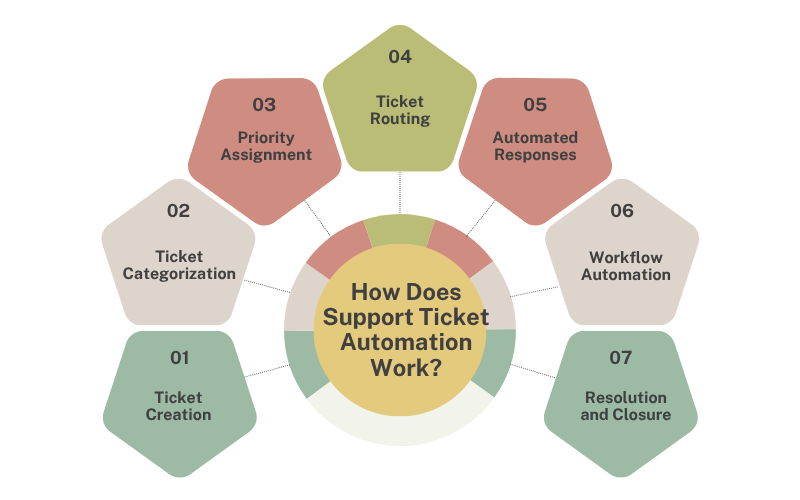
1. Ticket Creation
When a customer contacts the support team, the system automatically generates a ticket containing details such as:
- Customer name
- Contact information
- Issue description
- Submission time
- Communication channel
This ensures that every request is recorded and tracked.
2. Ticket Categorization
The automation system analyzes the request and assigns it to a specific category, such as:
- Technical support
- Billing issues
- Product inquiries
- Account management
- Service requests
Proper categorization helps support teams prioritize and resolve issues more effectively.
3. Priority Assignment
Not all customer issues require the same level of urgency. Automated systems can assign priorities based on predefined rules.
For example:
- Critical system outages receive high priority.
- General information requests receive lower priority.
- VIP customer requests may receive immediate attention.
4. Ticket Routing
After categorization, tickets are automatically assigned to the appropriate department or support agent.
Examples include:
- Technical issues → IT support team
- Billing concerns → Finance department
- Product questions → Customer success team
This eliminates delays caused by manual assignment.
5. Automated Responses
Many support ticket systems send automatic acknowledgment emails or messages to customers.
These messages typically include:
- Ticket number
- Confirmation of receipt
- Estimated response time
- Helpful resources or knowledge base articles
Customers immediately know their request has been received.
6. Workflow Automation
Automation can trigger various actions during the ticket lifecycle.
Examples include:
- Escalating unresolved tickets
- Sending reminders to agents
- Updating ticket statuses
- Notifying managers about overdue requests
- Reopening tickets when customers reply
These automated workflows help maintain service quality.
7. Resolution and Closure
Once the issue is resolved, the system can automatically close the ticket and request customer feedback.
Many businesses use this feedback to improve support processes and customer satisfaction.
You Can Also Read : What Is CRM Integration and Why Does Your Business Need It?
Key Features of Support Ticket Automation
Modern support ticket automation systems often include several advanced features.
Multi-Channel Support
Customers can submit requests through:
- Live chat
- Website forms
- Social media
- Mobile apps
- Phone support
All interactions are consolidated into a single platform.
AI-Powered Ticket Classification
Artificial intelligence can analyze ticket content and automatically determine:
- Issue type
- Priority level
- Recommended agent
- Suggested solutions
Service Level Agreement (SLA) Management
Automation helps businesses meet response and resolution targets by monitoring ticket deadlines and triggering alerts when necessary.
Knowledge Base Integration
Support systems can automatically suggest articles, FAQs, and troubleshooting guides to customers before they contact an agent.
This helps reduce ticket volume.
Reporting and Analytics
Automation platforms provide valuable insights, including:
- Average response times
- Resolution rates
- Customer satisfaction scores
- Agent performance metrics
- Ticket volume trends
These reports help businesses improve support efficiency.
Benefits of Support Ticket Automation
Support ticket automation helps businesses handle customer issues in a faster and more organized way. Instead of manually sorting every request, the system takes care of routing, tracking, and updates, making support smoother for both customers and teams.
Faster Response Times
One of the biggest advantages of support ticket automation is the ability to respond to customer inquiries much faster. Automated systems can instantly acknowledge customer requests, create tickets, assign them to the appropriate department, and even provide preliminary solutions through automated responses. This minimizes waiting times and ensures that customers receive immediate attention, leading to a more efficient support experience.
Improved Customer Satisfaction
Customers expect quick, accurate, and reliable support whenever they encounter an issue. Support ticket automation helps businesses meet these expectations by ensuring that every inquiry is handled consistently and without unnecessary delays. When customers receive timely updates and faster resolutions, they are more likely to trust the company and remain loyal to its products or services.
Reduced Manual Work
Support teams often spend a significant amount of time performing repetitive tasks such as sorting tickets, assigning them to agents, sending acknowledgments, and updating ticket statuses. Automation takes over these routine responsibilities, allowing support representatives to focus their time and expertise on resolving more complex customer concerns. This improves both employee efficiency and overall service quality.
Better Organization
Managing a large number of customer requests manually can quickly become overwhelming. Automated ticketing systems keep all customer interactions organized in a centralized platform where tickets are categorized, prioritized, and tracked throughout their lifecycle. This structured approach makes it easier for teams to monitor progress, avoid missed requests, and maintain a clear record of all support activities.
Increased Productivity
By eliminating repetitive administrative tasks, support ticket automation enables teams to handle a higher volume of customer requests in less time. Agents can concentrate on problem-solving rather than ticket management, resulting in faster resolutions and improved workflow efficiency. Businesses can enhance customer support performance without necessarily expanding their workforce.
Fewer Human Errors
Manual ticket management can lead to mistakes such as assigning tickets to the wrong department, overlooking urgent requests, or entering incorrect information. Automated workflows follow predefined rules and processes, significantly reducing the likelihood of these errors. This ensures greater accuracy, consistency, and reliability in customer support operations.
Scalability for Growing Businesses
As businesses expand, the number of customer inquiries and support requests often increases significantly. Support ticket automation allows organizations to manage this growing demand without sacrificing service quality. Automated systems can efficiently process large volumes of tickets, ensuring that customers continue to receive prompt assistance even during peak periods or rapid business growth.
Support ticket automation ultimately makes customer service faster, cleaner, and more reliable for everyone involved.
You Can Also Read : How to Integrate an AI Chatbot into Your Website
Common Use Cases for Support Ticket Automation
Businesses across industries use support ticket automation for various purposes.
E-commerce
- Order inquiries
- Refund requests
- Shipping updates
- Product support
SaaS Companies
- Technical troubleshooting
- Account management
- Subscription issues
- Feature requests
Healthcare
- Appointment scheduling
- Patient inquiries
- Insurance support
Financial Services
- Account assistance
- Transaction issues
- Customer verification requests
IT Support
- Incident management
- Service requests
- Password resets
- System maintenance tickets
Best Practices for Implementing Support Ticket Automation
To maximize the benefits of automation, businesses should follow these best practices:
Define Clear Workflows
Identify how tickets should be categorized, prioritized, and assigned.
Use Automation for Repetitive Tasks
Focus automation on routine processes while allowing human agents to handle complex issues.
Regularly Review Rules
Customer needs change over time, so automation workflows should be updated periodically.
Integrate Knowledge Bases
Provide self-service resources to reduce ticket volume.
Monitor Performance
Track metrics such as response time, resolution rate, and customer satisfaction to optimize the system.
Challenges of Support Ticket Automation
While automation offers many advantages, businesses should be aware of potential challenges.
- Over-automation can make interactions feel impersonal.
- Incorrect ticket categorization may occur if workflows are poorly configured.
- Complex customer issues still require human expertise.
- Initial setup may require time and planning.
The best approach combines automation with skilled human support agents.
The Future of Support Ticket Automation
Support ticket automation continues to evolve with advancements in artificial intelligence and machine learning.
Future systems will provide:
- Smarter ticket classification
- Predictive issue resolution
- Advanced customer sentiment analysis
- AI-powered virtual assistants
- Personalized support experiences
As technology advances, businesses will be able to deliver faster and more proactive customer service.
You Can Also Read : What Is Business Automation? Everything You Need to Know
Support Ticket Automation Services by Jowib Technologies
Jowib Technologies, we provide advanced Support Ticket Automation solutions designed to help businesses simplify and streamline their customer support operations. Our goal is to reduce manual effort while improving response speed and overall customer satisfaction.
Our support ticket automation system is built to handle the complete ticket lifecycle, including ticket creation, categorization, assignment, tracking, and resolution. Everything is managed in an organized and automated workflow so your team can focus on solving customer problems instead of handling repetitive tasks.
With our solution, businesses can:
- Automatically create and organize support tickets
- Route customer queries to the right department or agent
- Reduce response and resolution time
- Track all customer issues in a centralized system
- Improve customer experience and service quality
Jowib Technologies, we focus on building smart and scalable automation systems that work for startups, small businesses, and large enterprises. Our solutions are designed to grow with your business and handle increasing customer support demands without compromising efficiency.
We believe that great customer support should be fast, simple, and reliable — and our Support Ticket Automation services are built exactly for that.
Conclusion
Support ticket automation is a powerful solution that helps businesses manage customer support requests more efficiently. By automating ticket creation, categorization, assignment, and workflow management, organizations can reduce response times, improve customer satisfaction, and increase team productivity.
Whether you’re a small business or a large enterprise, implementing support ticket automation can streamline support operations and create a better experience for both customers and support teams. As customer expectations continue to rise, automation will play an increasingly important role in delivering high-quality service.